> ## Documentation Index
> Fetch the complete documentation index at: https://docs.truenroll.com/llms.txt
> Use this file to discover all available pages before exploring further.
# Fraud Detection (Forensics) Report
> Automated authenticity audit of uploaded documents.
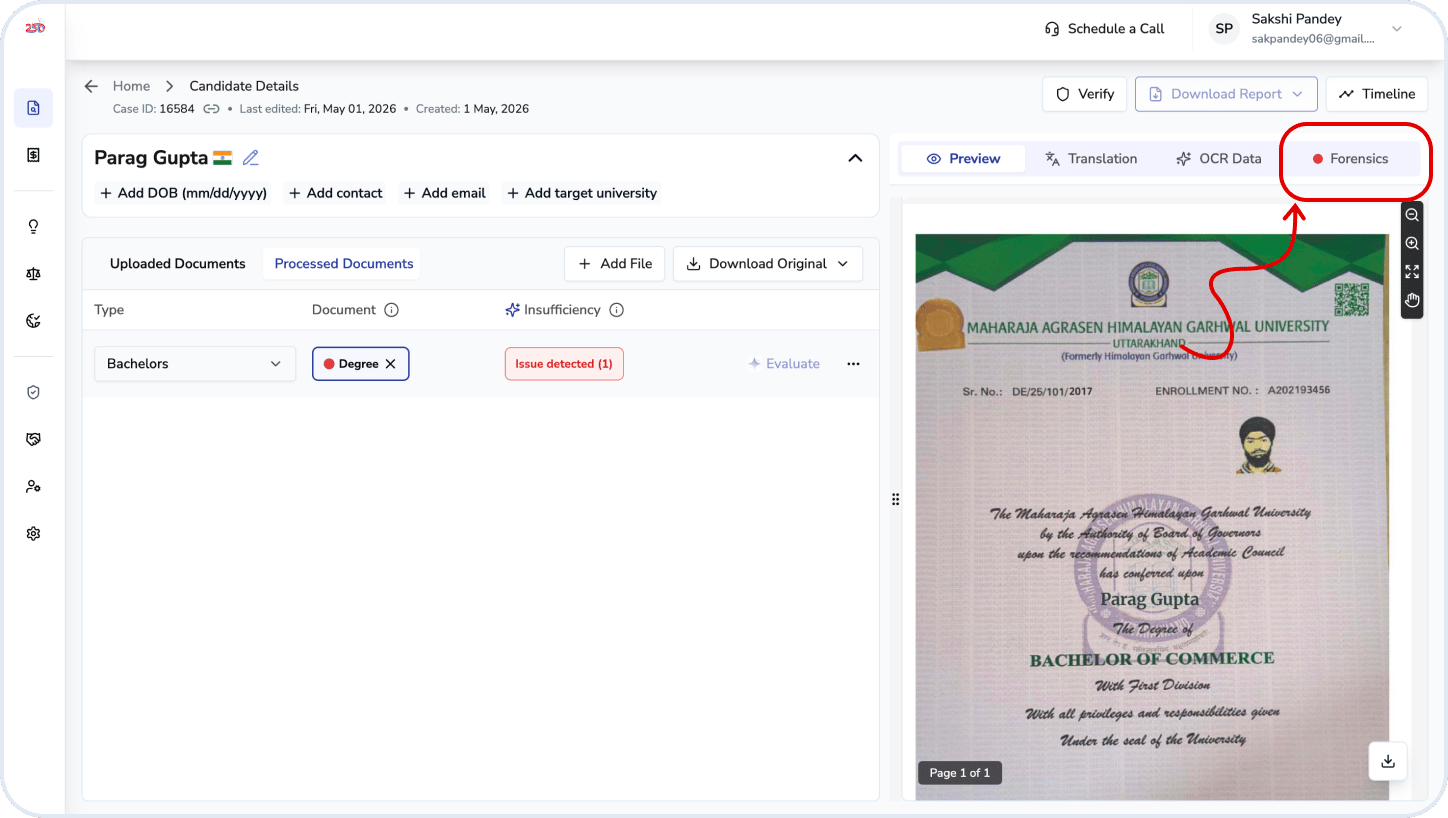
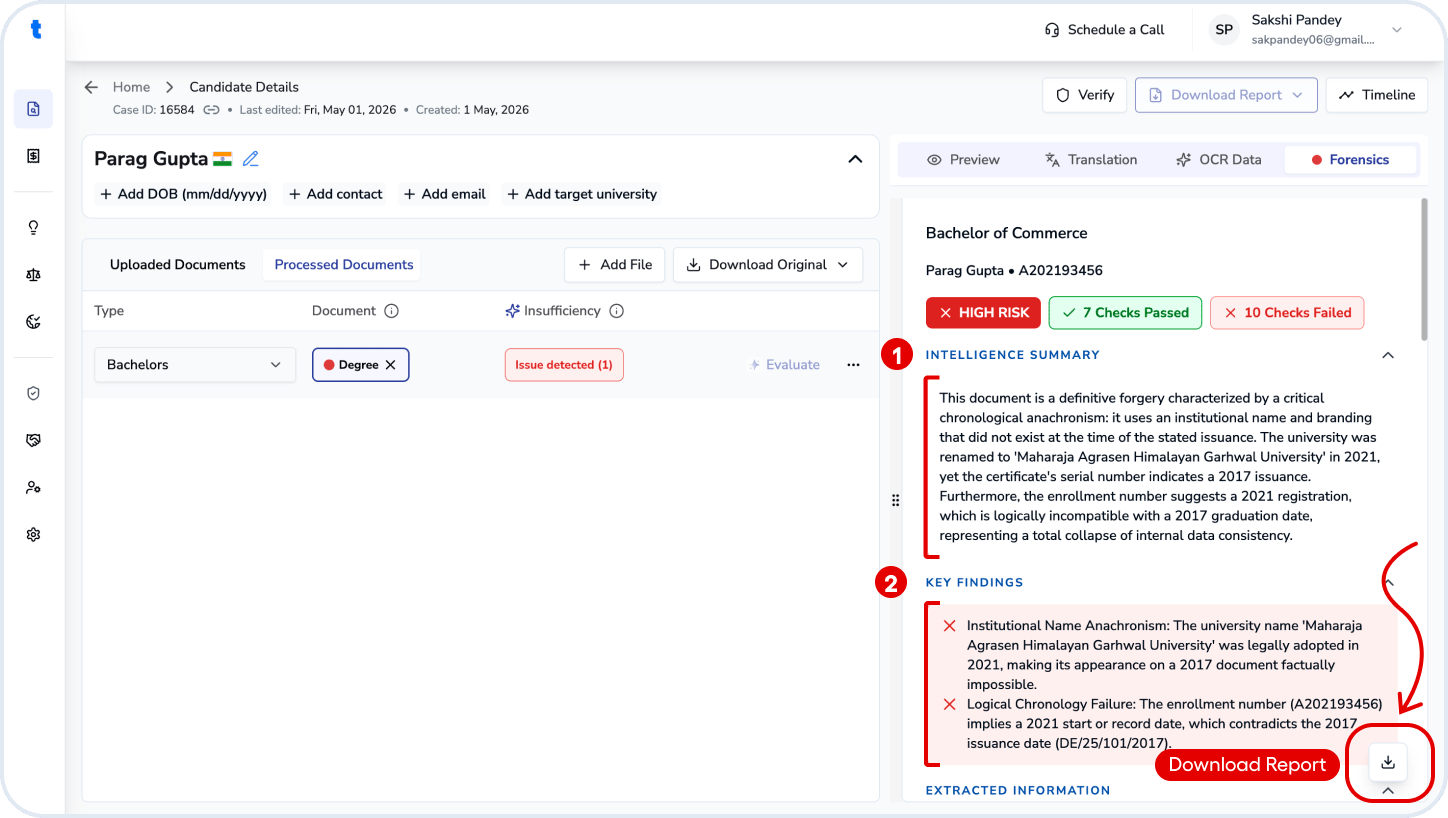
The Forensics report provides an automated authenticity audit of uploaded documents. Access it from the **Preview Panel → Forensics** in the *Review Candidate* step. You can also download the full report as a PDF using the download report button above the summary.
 ## Summary Information
The report summarizes document authenticity using multiple forensic checks and assigns an overall **risk level** (e.g., High Risk).
### Intelligence Summary
A short, high-level explanation of:
* Key consistencies (e.g., grading, timelines)
* Major concerns (e.g., metadata inconsistencies, missing security features)
This is the quickest way to understand why a document is flagged.
### Key Findings
Highlights the most critical issues detected. For example:
* Temporal inconsistencies in file metadata
* Missing digital verification features (e.g., QR code)
### Extracted Data
Basic document details — Candidate Name, Registration Number, Issuing Institution, Program / Qualification and Year of Issuance.
### Detailed Findings
#### Forensic Audit Check
The report evaluates multiple checks, each marked as **PASS or FAIL**:
* Arithmetic & grading consistency
* Date and timeline progression
* Multilingual consistency
* Internal Consistency
* Course and curriculum alignment
* Grading scale consistency
* Missing digital verification markers (e.g., QR code)
* Suspicious typography or formatting artifacts
* Metadata inconsistencies (e.g., file created before content existed)
* Visual anomalies suggesting edits or reconstruction
Each check includes a short explanation and supporting evidence.
## Summary Information
The report summarizes document authenticity using multiple forensic checks and assigns an overall **risk level** (e.g., High Risk).
### Intelligence Summary
A short, high-level explanation of:
* Key consistencies (e.g., grading, timelines)
* Major concerns (e.g., metadata inconsistencies, missing security features)
This is the quickest way to understand why a document is flagged.
### Key Findings
Highlights the most critical issues detected. For example:
* Temporal inconsistencies in file metadata
* Missing digital verification features (e.g., QR code)
### Extracted Data
Basic document details — Candidate Name, Registration Number, Issuing Institution, Program / Qualification and Year of Issuance.
### Detailed Findings
#### Forensic Audit Check
The report evaluates multiple checks, each marked as **PASS or FAIL**:
* Arithmetic & grading consistency
* Date and timeline progression
* Multilingual consistency
* Internal Consistency
* Course and curriculum alignment
* Grading scale consistency
* Missing digital verification markers (e.g., QR code)
* Suspicious typography or formatting artifacts
* Metadata inconsistencies (e.g., file created before content existed)
* Visual anomalies suggesting edits or reconstruction
Each check includes a short explanation and supporting evidence.
 ### Appendix
Provides low-level forensic details such as:
* Extracted image components
* Asset-level analysis across document pages
This section is mainly for deeper investigation.
## How to Use
1. Use the **risk level** and **intelligence summary** for quick assessment
2. Cross-check flagged issues with the original document in the preview (key findings)
3. Review **failed checks** carefully — these indicate potential fraud or tampering
4. If concerns remain, request additional documents or perform primary source verification
The report is an automated assessment and **not a legal certification of authenticity**. For high-stakes decisions, always perform additional verification where required.
## Related questions
Open the candidate record and navigate to the **Forensics** tab to review the flagged findings. Verify the highlighted issues against the uploaded documents and make any necessary corrections or overrides, providing a reason where required. Once all findings have been reviewed and addressed, the forensics scan can be saved as updated.
### Appendix
Provides low-level forensic details such as:
* Extracted image components
* Asset-level analysis across document pages
This section is mainly for deeper investigation.
## How to Use
1. Use the **risk level** and **intelligence summary** for quick assessment
2. Cross-check flagged issues with the original document in the preview (key findings)
3. Review **failed checks** carefully — these indicate potential fraud or tampering
4. If concerns remain, request additional documents or perform primary source verification
The report is an automated assessment and **not a legal certification of authenticity**. For high-stakes decisions, always perform additional verification where required.
## Related questions
Open the candidate record and navigate to the **Forensics** tab to review the flagged findings. Verify the highlighted issues against the uploaded documents and make any necessary corrections or overrides, providing a reason where required. Once all findings have been reviewed and addressed, the forensics scan can be saved as updated.